Pages

Showing posts with label Canon. Show all posts

Saturday, January 19, 2013

New Camera!

Well, just over a month ago I got myself a new toy! A Canon Powershot S2 IS!
Canon Powershot S2 IS
I've been playing with it quite a bit recently and trying out some effects along with my friend Dave (who also has a new camera!) and Will with some random photography. Some of my photos will appear on the blog soon, but a load will also hopefully appear in the WSAF Photographic Exibition in Xanana Lounge and The Cooler!
I cant be bothered reviewing this camera, the link above has more than enough of a hardcore review! My comments though… ITS GREAT!

Sunday, January 13, 2013


Canon PowerShot ELPH 500 HS
User Report

by David Elrich and Stephanie Boozer


With a 4.4x zoom, a 12-megapixel sensor, and easily pocketable style, the Canon 500 HS is targeted at the casual shooter, but has a touchscreen interface that's both intriguing and confounding at the same time. The 500 HS has plenty of features, though, starting with an f/2.0, 24-105mm equivalent, image-stabilized lens, 1080p Full HD video, and 8.2 frame-per-second (reduced res) capture, along with a whole host of special modes for easy photography in many situations, including low light.
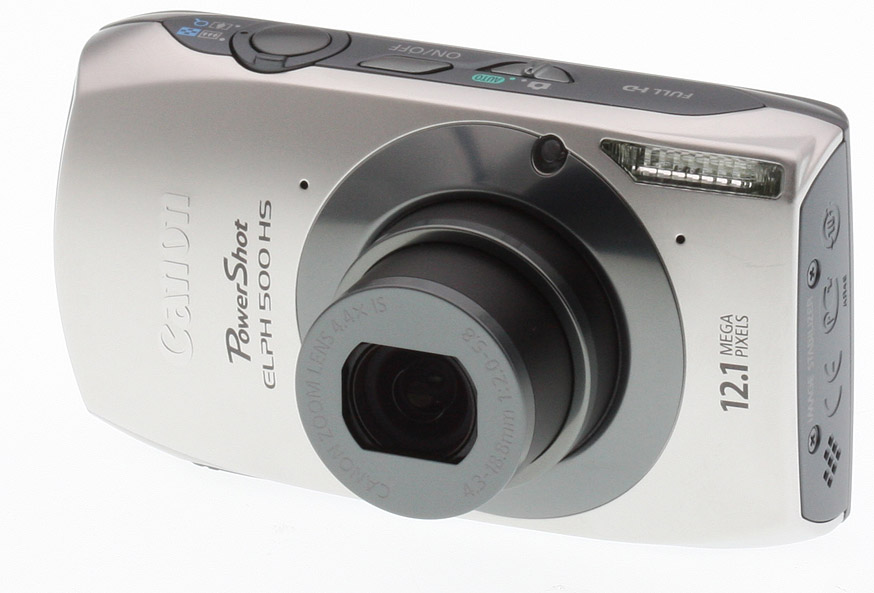
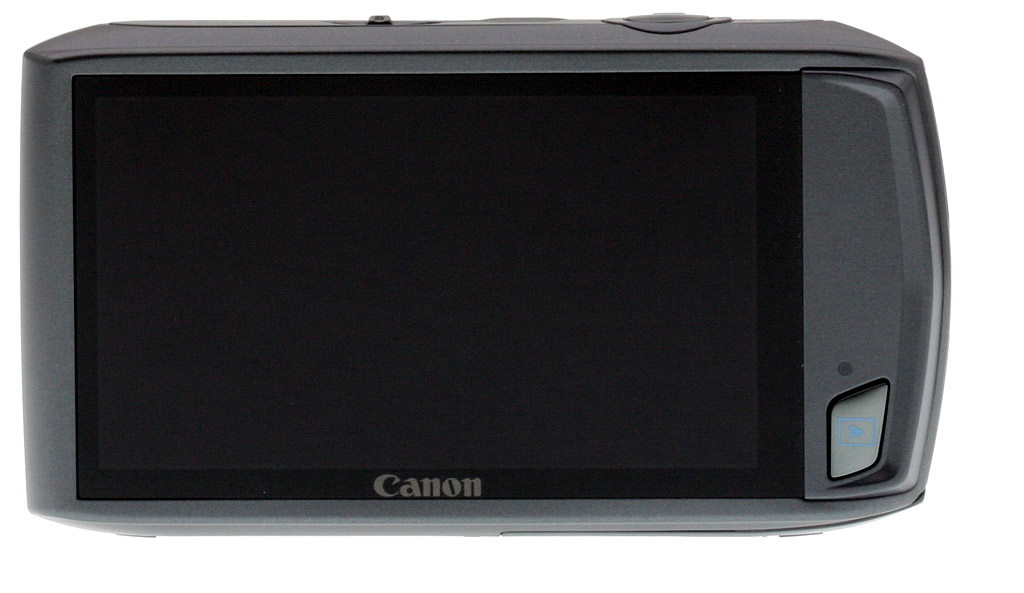
Look and Feel. The PowerShot ELPH 500 HS looks similar to one of the models it replaces, the SD3500 IS; the only main difference is the extra Playback button on the back, where the SD3500 had no buttons at all. The Canon 500 HS is able to get away with fewer buttons because it has a touchscreen, which is where you access most of the camera's interface. We'll get into this more deeply later, as the touchscreen is a key feature on the 500 HS. And for the record, the 500 HS also replaces the SD4000 IS with its 10-megapixel CMOS imager and 3.8x zoom (28-105mm). In fact, the 500 HS is something of a combination of the two.
Our test sample had a nice pewter silver tone and it's also available in pink and brown, two decidedly unattractive colors. Although it has the classic ELPH box and circle design, it has rounded and beveled edges, taking it beyond the usual hard-edged rectangle. Since the 500 HS has a wide 3.2-inch LCD screen, overall it's wider than the usual digicam, measuring 3.96 x 2.18 x 0.98 inches (100.6 x 55.4 x 25.0mm) and weighs 6.56 ounces (186g) with battery and card.
There aren't too many distracting logos and icons on the front and the ELPH "circle" has nicely accented color. Also on the front is the flash, self-timer/AF Assist lamp, and two pinhole mics to capture stereo sound for the videos.
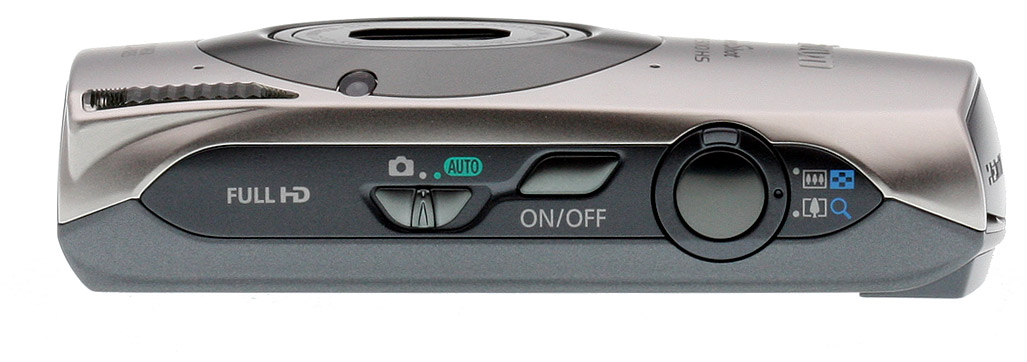
On the top of the ELPH 500 HS is the on/off button, shutter button surrounded by a very tiny raised zoom toggle and a switch that moves between Auto and Program. The zoom toggle is way too small and almost pokes your finger with its relatively sharp edge. I haven't encountered an issue like it before. It's definitely not Canon's finest hour.
Touch. There's no mode dial on the top, back, or anywhere else; you'll use the touchscreen to access every parameter. At this point you might expect me to say, "If you're looking to adjust aperture and shutter speeds look elsewhere." Surprisingly, this point-and-shoot lets you make those tweaks -- just like the SD4000 IS -- but with more limited control than you'd get on a PowerShot S95/G12. At full wide angle, available apertures include f/2.0-f/8.0, while shutter speeds of 15 seconds-1/1,000 are available at all times, with 1/1,600 second available in bright conditions when it's needed, particularly in Aperture priority mode. In Tv (shutter priority) mode, however, the camera can only be set up to 1/1,250 second. The 500 HS also has an ND filter, which the camera employs when necessary, like when you're using a wide aperture in bright light. "ND" appears in the lower left corner when the filter is active.
As for all controls other than Power, Shutter, Zoom, and Playback, you simply use your fingers to tap or swipe through your options on the touchscreen. The Canon 500's 3.2-inch LCD screen has 461K dots, has very good contrast, and was mostly usable even in direct sunlight. It had some reflectivity issues, and like every touchscreen, a handy cloth is important in order to remove fingerprints. The screen has good, strong blacks and it's a winner. I wish Canon hadn't buried the LCD brightness adjustment so deeply in the menu system, but perhaps next year.
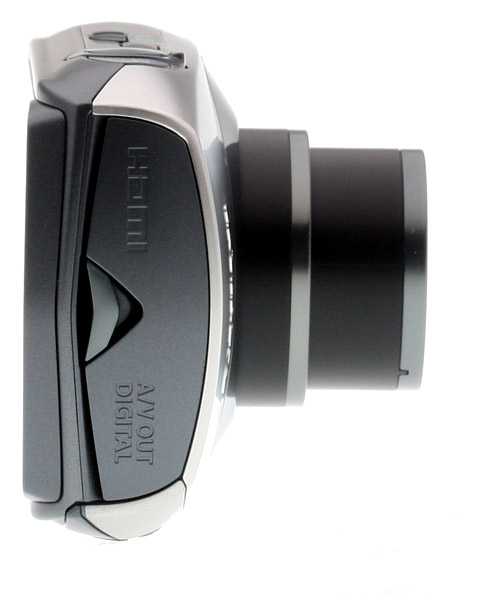
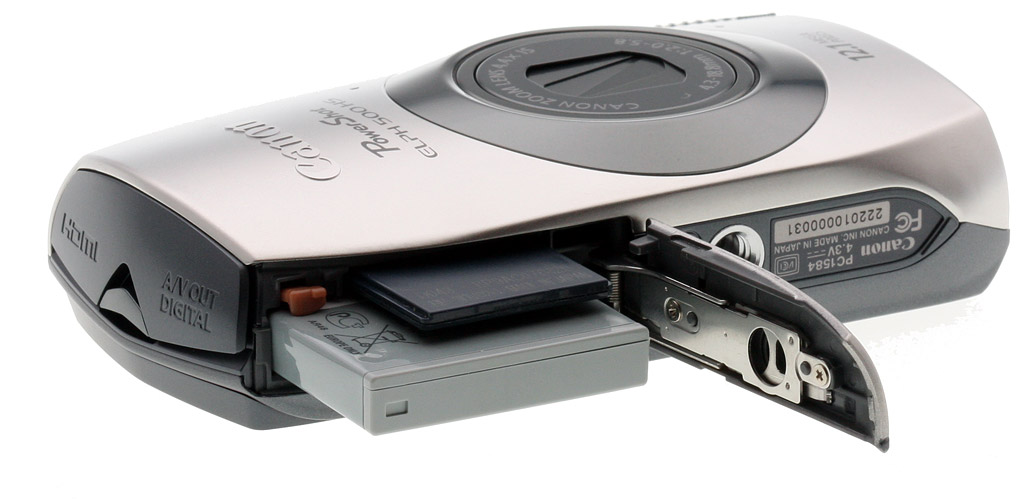
On the right side is a compartment for USB/Stereo AV and mini HDMI ports as well as the eyelet for the wrist strap. The door hinge is plastic, so a slow and easy touch is required. On the left is a speaker while the bottom of this Made-In-Japan digicam has a metal tripod mount and compartment for the battery and card (it accepts newer SDXC media). The battery is rated a weak 180 shots, per CIPA standards. The Canon SD3500 was rated at 220, the SD4000 250, for comparison.
Lens. The Canon ELPH 500 HS has a very wide 4.4x optical zoom with a 35mm equivalent range of 24-105mm. I prefer wider-angle digicams versus massive -- and decidedly more bulky -- mega-zooms. As always, this is my preference and you may want the reach of a Nikon P500 or Canon SX230 HS. The opening f-stop is a bright f/2.0. The lens is made up of seven elements in six groups. There are two double-sided aspherical lenses (including one UA lens) and one single-sided aspherical lens. Macro gets as close as 1.2 inches (3cm).
The ELPH 500 HS is relatively small and wide so you'll use a two-handed four-finger grip on the corners. Even with the light weight, stabilization is important, and this $300 camera has optical image stabilization, not sensor-shift -- a real plus as you'll see when we discuss image quality.
Controls. There aren't any! Yes, this may be an overstatement, but given there's no mode dial or four-way controller you'll make all your changes via the touchscreen. There is one big difference between Canon's 2011 and 2010 touchscreen ELPHs. The new Canon 500 HS has a slightly smaller display (3.2 versus 3.5), but I gladly gave up that real estate for a better-positioned, dedicated Playback button on the lower right. The button for the SD3500 IS was tucked between the operation and on/off switches and was a bit cumbersome. More importantly, the slightly smaller screen gives you more space to rest your thumb for a sturdier grip. Both cameras have a weird feature called Active Display where you tap the side of the camera to move through your shots during Playback. And you can advance through the photos by tilting the camera if you didn't want to swipe through them. You can also press on the left and right of the screen, which will turn into an arrow (one that's hard to see because your thumb is there); press and hold and it scans rapidly through the images. Swiping also works well enough, provided you press a little harder than you would on the average smartphone.
Now I'm all for taking chances and open to new advances in camera design, but I thought banging on the side of a camera and shaking it seemed a little risky.
Even Movie recording is activated via the Canon 500 HS touchscreen. There's a red dot in the upper right corner of the touchscreen. Just tap it and you can record HD clips. Video quality is better at 1080p, too.
Modes. When I received the Canon 500 HS, I expected a similar Auto and Program setup to the 300 HS and so many other Canon point-and-shoots. But this ELPH has many of the tweaks one expects on the more enthusiast-oriented PowerShot G12, S95, and SD4000 IS. I can't think of too many aim-and-forget cameras with Aperture- and Shutter-Priority, yet that's what you'll find here.
Of course this is an ELPH, so the Auto setting is very consumer friendly. It has the Smart Auto system of the 300 HS and it recognizes 32 scenarios in front of it and adjusts accordingly. Adjustable options in Auto are limited, which is also typical. All you can change is still/movie resolution, compression, aspect ratio, flash (Auto/Off), and the self-timer.
Move the top switch toward the left to Program and a much wider imaging world opens up. In the basic Program mode you can adjust ISO (Auto, 100-3200), White balance (six picks including custom), exposure compensation (+/- 2 EV) and flash (four options instead of the two in Auto). Tap the P in the upper left corner and a plethora of choices appears, arrayed as square buttons, six across the screen. Along with Aperture- and Shutter Priority there are classic scene modes (Portrait, Kids&Pets, and so on). There are also a number of fun filters such as Fish-Eye, Miniature, Toy Camera, and Super Vivid. This ELPH is designated HS, which stands for High Sensitivity, because it has a BSI (backside illuminated) CMOS sensor, a DIGIC 4 processor, and a brighter lens, all optimized for better performance in low light. Features like Handheld NightScene uses this high sensitivity capability to its fullest, combining several shots to reduce blur and noise in low-light situations.
High Definition video is practically part of the camera owner's Bill of Rights in 2011 and the ELPH 500 HS records Full HD 1,920 x 1,080 videos at 24 fps with stereo sound and supports optical zoom; it uses the MPEG-4 AVC H.264 codec (MOV format). Clip length is limited to about 10 minutes. You can also shoot at lower resolution if you simply want to post some clips online. The range of resolutions includes 1,920 x 1,080p at 24fps, 1,280 x 720p at 30fps, 640 x 480p at 30fps, 320 x 240p at 30fps. The onscreen red Record button appears in all modes, and works in most modes, applying whatever effect is selected, including Miniature mode. However, in modes like Toy Camera, pressing the onscreen Record button brings up a tiny yellow exclamation point, indicating that video recording is unavailable in this mode.
Menus. By now you know this is a touchscreen camera, so you'll tap and swipe your way through the menu system. For the most part, it looks like the Canon menu systems found on more traditional cameras, except that you use your finger or thumb scroll up and down or left and right to get the parameter you want, then tap on it rather than press an OK button. It works just fine, though you have to press a little harder than on a cell phone, as noted.
I liked the ability to change the background colors of the text to your preference (mine was orange) but there's also blue-gray, khaki, and pink.
When you're in Auto there are just a few choices available and you get to them by tapping the Function button on the lower left, then pressing the appropriate text or icon. In Program you can swipe through the options which show up as large, very readable icons. It's nicely done. When I reviewed the SD3500 IS I took exception to the fact the Menu icon doesn't appear until you tap Function. This time around it didn't seem as frustrating; it was just a different approach. Just remember that you have to press the Function button in the lower left, then look to the lower right for the Menu button to appear.
Storage and Battery. The Canon ELPH 500 HS uses SD, SDHC, and SDXC cards as well as Eye-Fi and a variety of Multimedia card formats. Since the camera takes Full HD video, a Class 6 or higher card should be used; 8GB or more should be considered as a 4 gig card only holds 14 minutes 34 seconds of best HD resolution videos.
The Canon 500 HS is supplied with an NB-6L lithium-ion battery and a plug-in charger (CB-2LY). Per CIPA standards it lasts for 180 shots in still mode. Last year's SD3500 IS with an even larger screen lasted for 220 shots -- go figure. There's no question the touchscreen drains the battery like vampires on a binge, and it didn't last very long during multiple outings. A spare battery is absolutely essential.
Playback. The playback options of the Canon ELPH 500 HS are varied but the coolest feature is the fact you can swipe through your images and breeze through dozens very quickly. If you want to do it more slowly you can tap on the edges of the screen and move one at a time. Unfortunately you cannot zoom in on the images by spreading your fingers. Tapping the photo itself enlarges the shot and +/- magnifying glasses appear for making adjustments. Tapping the icon on the top left lets you choose how many thumbnails will appear (up to 13x10). Hit Display on the lower right and you get a view with some metadata and a histogram, another with an enlarged inset to check your focus. You can also review your photos by shot date. Pushing the zoom toggle to the left also changes the size of the thumbnails; pressing right lets you zoom in/out.

Shooting with the Canon PowerShot ELPH 500 HS

I used the Canon 500 HS over a period of several weeks traveling to New Jersey's Asbury Park (the original "Jersey Shore" where rocker Bruce Springsteen played). Most of the shots were taken outdoors and I performed my usual indoor tests in available light (flash off).
The Shore. Having a 24mm along is great for getting a picture of the real Jersey Shore.
Touchscreen. I found the touchscreen -- one of the key features of this digicam -- quite enjoyable. Moving through the options is a breeze, although using your fingernail rather than a fingertip gets better results for specific changes. And if your nails aren't long enough, the camera's wrist strap has a slider with a small stylus you can use to tap the screen. This is a very smart just-in-case addition, and better yet, it can't get lost like a separate stylus.
The touchscreen can also be used to set autofocus area, and in Face-detection mode, to select a face you'd like the camera to emphasize. In Face-detection, once the face is selected, the camera will continue to track the subject, setting focus and exposure accordingly until you press the shutter. When not in FD mode, the camera waits for you to half-press the shutter before focusing. When you do, the selected AF area zooms in a small box to help confirm focus. Unlike other recent cameras with touch, the Canon 500 HS has no touch shutter mode, where the camera focuses and fires on whatever subject you select.
Wide and tele. Ranging from 24-105mm, the Canon 500 HS serves basic snapshot needs quite well, gathering a lot more at wide-angle than most lower-priced pocket cameras.
I'm a big fan of digicams with wide-angle lenses, and in this case it's 24mm. At 24mm, you have to watch for distortion of faces, so it's better to zoom in a little with a camera like this; but 24mm does wonders for landscapes and architectural images. The Canon ELPH 500 HS has a 4.4x optical zoom (24-105mm) so you're not getting the most potent mega-zoom on the block, but then again this is a compact digicam that weighs less than 7 ounces fully loaded.
I did all of my shooting at maximum resolution (4,000 x 3,000 pixels Fine) and Full HD video. The camera worked well with decisive autofocus. The zoom moved smoothly and quickly through the limited range, but that little edge on the toggle was still annoying. Canon claims 3.4 fps at highest resolution, but my speed was under 3--which is still pretty good for a point-and-shoot. The lab tested it at about 2.2 fps with large/normal JPEGs. As is the case with many digicams, you have to be in Program to access the burst mode; in Auto it's only single shot. There's also a High Speed Burst scene mode that Canon claims will capture up to 8.2 frames per second, but the fastest we could record was 6.3 fps.
Asbury. Captured here in Super Vivid mode, the Asbury Park building shows good detail, though the red bricks seem to lack texture, probably due to noise suppression, which is active even at low ISO.
Asbury Park is a fabled and faded seaside town that has undergone extensive renovation over the past few years. I remember shooting building exteriors with a 6.1MP Konica Minolta Maxxum 5D DSLR (circa 2005) and the peeling paint of the Paramount Theater on the boardwalk was a good test for image detail. The painting's redone, but the building is still a challenge with its many colors and frescoes. The Canon 500 HS handled it well. Mega blow-ups on the monitor of brick grout showed just how much detail this camera captured, though the red bricks appear quite soft, just as we saw in the red leaf fabric of our Still Life shot in the lab. A dozen prints also reinforced what my eyes were seeing. I even captured seagulls on the fly. Photos taken outdoors of buildings, signs, amusement cars and a kids' water park are less challenging, but all were very high quality and very sharp, far better than the shots taken with the Canon 300 HS. Although both have similar "engines," the lenses are different and clearly the 500 HS has better glass.
Filters. Filters are becoming quite popular in 2011 and the Canon ELPH 500 HS has its share of fun ones. Even with the wide 24mm lens, the camera has a Fish-eye option that adds some over-the-top perspective distortion to your images. I suggest using it for landscapes rather than people, unless you want to raise the ire of your subjects. Others include Toy Camera and Miniature that offer nice tricks but don't ring my bell. I enjoyed Super Vivid which takes colors on a bit of a psychedelic journey.
Handheld NightScene
ISO 1,600
Program
ISO 3,200
Low Light Scene Mode
ISO 2,000, 3MP
Handheld NightScene vs alternatives. The three samples above show the benefits of merging three images into one for a smoother image in Handheld NightScene without having to accept higher noise and noise suppression of ISO 3,200 or the lower resolution of the 3-megapixel Low Light mode.
Handheld NightScene is not a filter per se but as with the 300 HS, I liked the results as it combines three shots in dim light to bring out detail and reduce noise. I took some shots using Handheld NightScene, then raised the ISO up to the maximum of 3,200 in Program for comparison. I also shot in Low Light mode which drops the megapixel count to three. Just like the Canon 300 HS, low-light shooting with the Canon 500 HS is not only possible but something you'll like.
Overall white balance did relatively well in tungsten light, manual looks good but tungsten WB setting is very pink, a fairly common trait with Canon cameras. Performance of the Canon 500 HS is about average, per our lab results below.
LCD. It was a very bright day during my walk along the shore and the screen held up for the most part, even with the sun directly behind me. In some instances my face reflected off the LCD. Not being a total narcissist it was annoying, as was having to dig way too deep in the menu system to brighten the display a little. These were the most extreme conditions, however. In relatively normal use indoors and out, the screen was more than satisfactory as the 461K dots delivers the goods -- quality, color, and contrast.
Full HD. 1,920x1,080 at 24 fps with stereo sound. Click to download 45.9MB MOV file.
Video. I recently reviewed a $1,699 JVC 3D Full HD camcorder that captured spectacular video, so it takes a lot for a still camera's movie-taking capability to impress me -- not surprisingly, I wasn't overwhelmed by the Canon 500 HS. It takes 1,920 x 1,080 videos at 24 fps (not 30 or 60) so the results were decent but a bit jerky. Colors were fairly accurate and it offers optical zooming. With the switch set to Program mode, you can also use 11 of the built-in effects for video. Not all effects are available, though, including fish-eye, toy camera, and creative lighting.
There are also Super Slow Motion modes: 640 x 480p at 120 frames per second and 320 x 240p at 240 frames per second, and an iFrame mode that records 1,280 x 720 at 30 fps. It records stereo sound, but if you zoom while shooting, the noise may be picked up on your soundtrack. As with all digicams, the small mics magnify wind noise and a breezy day at the shore sounded like the center of a tornado. Even so, it's a nice tool to have at the ready if the occasion arises; just don't expect the dedicated-camcorder quality.
Overall, the Canon ELPH 500 HS has a lot going for it, certainly more positives than negatives. See our image, optical and performance analysis below, and the conclusion as well.

Canon PowerShot ELPH 500 HS Lens Quality


Wide: Sharp at center
Wide: Very soft at upper right
Tele: Slightly soft at center
Tele: Similar blurring, upper right corner
Sharpness: The wide-angle end of the Canon PowerShot ELPH 500 HS' zoom shows strong blurring in the right corners of the frame compared to what we see at center, though blurring in the left corners isn't as extreme. Blurring also does not extend very far into the image area. At telephoto, performance is better -- though the overall image is a hint soft, corners appear to have about the same level of sharpness as the rest of the frame. Still pretty good results overall.


Wide: Slight barrel distortion; barely noticeable
Tele: A tiny amount of barrel distortion, almost invisible
Geometric Distortion: There is surprisingly very little barrel distortion at wide-angle (~0.3%), and almost no perceptible distortion (~0.08% barrel) at telephoto. Thus, the PowerShot ELPH 500 HS' intelligent processor works hard here.


Wide: High, bright
Tele: High, but less bright
Chromatic Aberration: The PowerShot ELPH 500 HS' wide-angle zoom setting shows fairly high chromatic aberration in terms of pixel count, and pixels are quite bright. At telephoto, the distortion is still fairly high, though pixels aren't as bright.


Macro
Macro with Flash
Macro: The Canon PowerShot ELPH 500 HS' Macro mode captures a sharp image with strong detail in the central portion of the frame, though blurring in the corners is a little strong (a common limitation among consumer digital cameras in macro mode). Minimum coverage area is 1.77 x 1.33 inches (45 x 34mm), which is good. The camera focuses so closely that the flash is blocked by the lens, resulting in harsh shadowing in the lower right corner, and a hot spot in the upper left.


Canon PowerShot ELPH 500 HS Viewfinder Accuracy


Wide: LCD Monitor
Tele: LCD Monitor
Viewfinder Accuracy: The Canon PowerShot ELPH 500 HS' LCD monitor showed about 100% coverage at wide-angle and at telephoto. Excellent results here.


Canon PowerShot ELPH 500 HS Image Quality


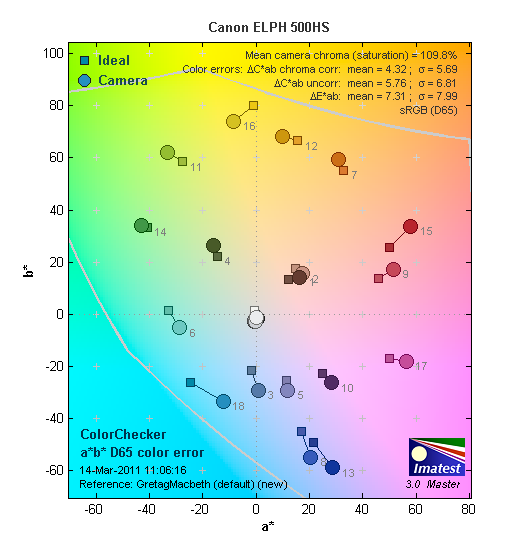
Color: The Canon PowerShot ELPH 500 HS produced good overall color, with nearly accurate saturation in most areas. Strong reds and blues are pushed a little, and bright yellows are somewhat muted, but results are a little better than average. Hue shifts are present in cyans and yellows, but here again, overall performance is better than average. Dark skintones are nudged just slightly toward red, while lighter skin tones show a tiny push toward pink. Overall though, good results.


Auto WB:
Good, though slightly warm
Incandescent WB:
Too pink
 
Manual WB:
Very good
Incandescent: Manual white balance handled our incandescent lighting much better than the Incandescent setting, which came out much too pink. Auto produced better results than average, though with a slight reddish tint.


Horizontal: 1,900 lines
Vertical: 1,800 lines
Resolution: Our laboratory resolution chart revealed sharp, distinct line patterns down to about 1,900 lines per picture height horizontally, and to about 1,800 lines vertically. Extinction of the pattern occurred at around 2,600 lines per picture height.


Wide: Bright
Tele: Also pretty bright

Auto Flash

Flash: Though our manufacturer-specified testing (shown at right) takes the camera out of the main lab at the rated distance of 16 feet, results here are still fairly bright, though the camera increased ISO to 500. The telephoto test came out nice and bright at the rated distance of 6.6 feet, though again, ISO was increased to 500.
Auto flash produced bright results in our indoor portrait scene, retaining some of the ambient light by using a slower shutter speed of 1/20 second, and raising ISO to 320. Movement of the subject could be problematic at this shutter speed, though the camera's optical image stabilization should help avoid blur due to camera shake. Shot taken at ~5 feet (~1.5m) on a stable tripod.


100
200
400
800
1,600
3,200
ISO: Noise and Detail: Detail is quite good at ISO 100, and despite minor softening, is fairly strong at ISO 200. More visible softening begins at ISO 400. Chroma (color) noise remains fairly well controlled, though luminance noise and noise suppression efforts, greatly blur fine details from ISO 800 on up. However, results at ISO 3,200 are better than average, despite being very fuzzy. See Printed results for more on how this affects printed images.


Print Quality:
ISO 100 shots are usable printed at 16x20 inches, with good detail. There is some sign of noise suppression at this size, however, and reds are softer than we like to see. Most of these elements look better at 13x19 inches.
ISO 200 shots are better at 11x14, as noise suppression makes them a little too soft for 13x19.
ISO 400 images are better at 8x10.
ISO 800 shots are quite usable at 8x10.
ISO 1,600 files print better at 5x7 inches, with pretty good detail and color.
ISO 3,200 shots are better kept to 4x6 inches, which isn't bad at all.
Image quality decays rather rapidly as ISO rises, but the Canon 500 HS can produce a usable print from all settings, which is good and should serve most casual shooters just fine.


Canon PowerShot ELPH 500 HS Performance


Startup Time: The Canon 500 HS takes about 1.9 seconds to power on and take a shot, about average for its class.

Shutter Lag: Full autofocus shutter lag is fair at wide angle (0.50 second), though a bit more sluggish at telephoto (0.68 second). Prefocused shutter lag is 0.082 second, not the fastest out there, but still pretty quick.

Cycle Time: Cycle time is also just okay, capturing a large/fine frame every 1.96 seconds in single-shot mode. We measured 1.63 frames per second in Continuous mode with large/fine quality JPEGs, and 2.18 frames per second with large/normal JPEGs. High Speed Burst mode captured 3-megapixel images at 6.29 frames per second. There was no apparent buffer limit in any mode.

Flash Recycle: The Canon PowerShot ELPH 500 HS' flash recycles in about 6.8 seconds after a full-power discharge, on the slow side of average.

Low Light AF: The camera's AF system was able to focus down to just below the 1/8 foot-candle light level without AF assist enabled, though the camera was able to focus in complete darkness with the AF assist lamp enabled.

USB Transfer Speed: Connected to a computer or printer with USB 2.0, the Canon PowerShot ELPH 500 HS' download speeds are slower than some. We measured 4,241 KBytes/sec.


In the Box

The retail package contains the following items:
  • Canon PowerShot ELPH 500 HS
  • Wrist Strap
  • Battery Charger CB-2LY
  • Battery Pack NB-6L
  • Analog A/V and USB Cables
  • 36-page Getting Started guide
  • Canon Digital Camera Solution Disk Ver. 85.0 with software and full User Guide

Recommended Accessories

  • Extra battery pack is a must
  • Protective case
  • Large capacity, high-speed SDHC/SDXC memory card. 8GB makes sense if you plan on shooting lots of HD video.

Canon PowerShot 500 HS Conclusion

Pro: Con:
  • 12.1-megapixel BSI CMOS sensor
  • Outstanding 3.2-inch LCD screen rated 461K dots
  • Compact size with 4.4x optical zoom lens
  • 24-105mm eq. lens is very wide with reasonable telephoto reach
  • Excellent low-light shooter
  • Optical image stabilization
  • Tack-sharp stills
  • Usable prints at all ISOs
  • Fun filters add interesting effects to snapshots and movies
  • Enjoyable, intuitive touchscreen interface
  • Aperture and Shutter Priority modes
  • Very good overall color
  • 1,920 x 1,080 video at 24 fps with stereo sound
  • Optical zoom supported during videos
  • Smart Auto analyzes each scene to pick the correct settings (32 options)
  • Accepts SDXC and Eye-Fi cards
  • HDMI output
  • Tiny, hard-edged zoom toggle switch
  • Below average battery life
  • Noticeable chromatic aberration, especially at wide angle
  • 24 fps videos a bit jerky
  • Mics exaggerate wind noise
  • LCD adjustment buried in menu system
  • Heavy softening in upper right corner at wide angle
  • Sluggish 1.6 fps burst mode at best quality
  • No RAW mode
  • Output compartment door seems flimsy
  • Touchscreen is not as sensitive as smartphones, so it takes some time to get used to it

I really liked the color, tone and sharpness of photos taken with the Canon PowerShot ELPH 500 HS. Although it doesn't have all of the options of an enthusiast-grade digicam (it's missing full Manual) or even an entry-level DSLR, it has decent options for aperture and shutter speed. I doubt many buyers of this ELPH will even go there, but at least it offers something for those who want to go beyond Smart Auto. It has a nice selection of filters, and handles low light well, thanks to Canon's HS system. Touchscreen operation was quite good. Some may not like it, but don't count me as one of them. The Canon 500 HS does have one very serious shortfall -- a short battery life, likely due to the touchscreen. A spare battery is an absolute must if you purchase this camera.
The only major operational flaw is the hard edge on the tiny zoom toggle. The Canon 500 HS is essentially a combination of last year's SD3500 IS and SD4000 IS with some improvements including better low-light shooting and higher video resolution. Call me crazy, but I'd like to see Canon incorporate this touchscreen on a mega-zoom and a true enthusiast camera. If purists can begrudgingly accept electronic viewfinders in "DSLRs", a touchscreen shouldn't be such a big leap of faith. For all its minor foibles, the Canon PowerShot 500 HS is a winning ELPH worthy of a Dave's Pick.

Canon PowerShot SX40 HS Review


Megazoom digital cameras aren't quite as good in low light, but if you want to zoom into a far-away object, you want nothing else. Canon has been a player in this game for a long time, but it has never been my favorite megazoom. The very earliest long zooms were pioneered by Olympus, which continues to produce some compelling designs. But Panasonic, Fujifilm, Casio, Canon, and Nikon have joined the game since the 18x zoom days.
Not that there was anything amiss with Canon's image quality, but using the Canon megazooms was just not quite as pleasant an experience. With the SX40 HS, Canon is challenging for the league lead. Canon fans may not have minded the flaws of its predecessors, but the Canon SX40 HS is a camera that anyone interested in a megazoom should consider. It was a delightful experience.
Look and Feel. Sculpted, that's the word. Sculpted like an EOS dSLR, in fact, with those Brooks Brothers natural shoulders. Mad men. But the Canon SX40 fits the hand so well, so comfortably, that you don't even think of discrete components like a grip or the controls. It's all just one very attractive sculpture.
Though it's compact even compared to other compact megazooms, the Canon SX40 still won't fit in your pocket. It's too square. The lens on one axis and the body on the other. But you won't mind swinging the Canon SX40 from your shoulder or your wrist. It looks good. Form and function, everywhere you look.
In fact the only part that fails the design test is the eyelet for the shoulder strap. It's nicely built into the body so it doesn't protrude, but like many other Canon eyelets, it has sharp edges that could fray the strap.
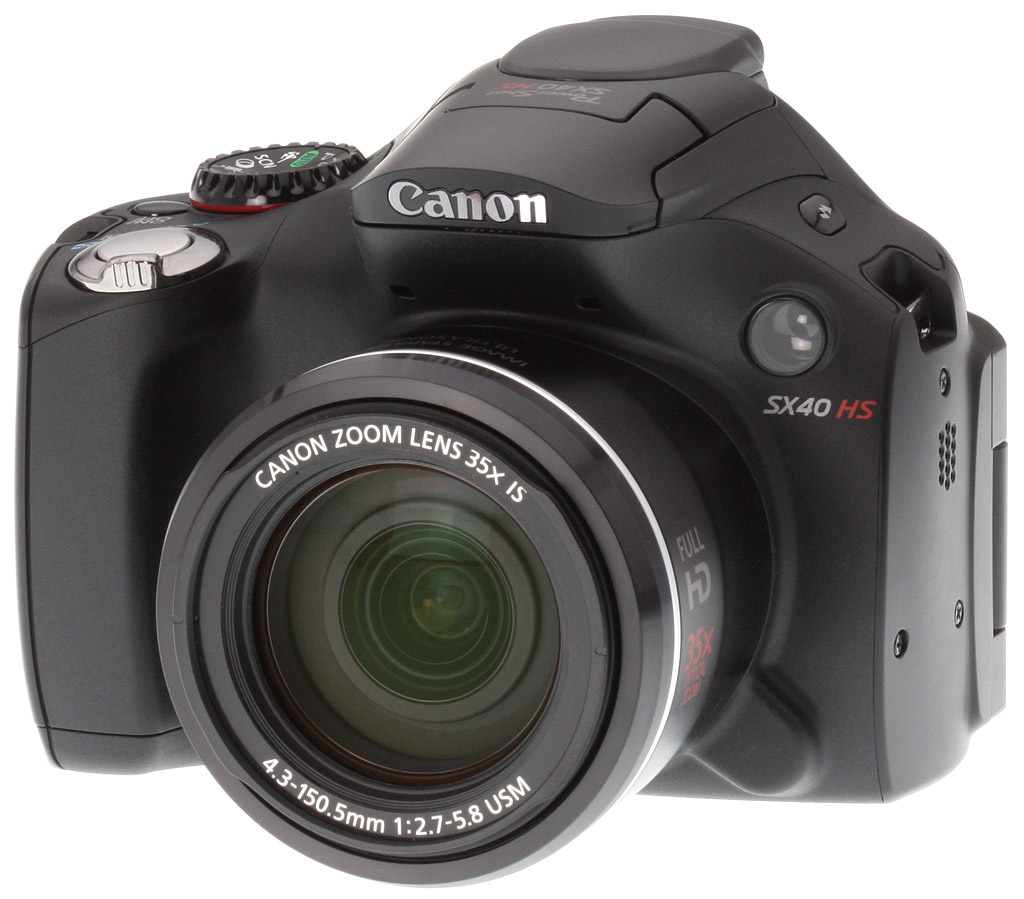
Let's take the tour. The front of the Canon SX40 HS is dominated by the 35x lens, which has markings on the top of the barrel to indicate focal length. The lens has a lens hood/filter mount as well (hood not included). At the one o'clock position there's a focus-assist/self-timer lamp, which flashes a bright green to warn you when the self-timer is active. The built-in flash overhangs the lens until you simply lift it up to activate it. The overhang also houses the two stereo microphones, shielding them a bit from the wind. The grip is hard plastic but molded to resemble a soft grip.
On top the hot shoe is covered by a flexible cap right behind the built-in flash. A flash button to the left cycles through the flash options when you lift the flash up to activate it or attach an external flash to the hot shoe. On the other side of the hump, the Mode dial cuts into the shoulder leaving just enough room for the Canon SX40's Power button to its right. At the front edge of the grip is the Shutter button surrounded by the smooth, two-speed Zoom lever.
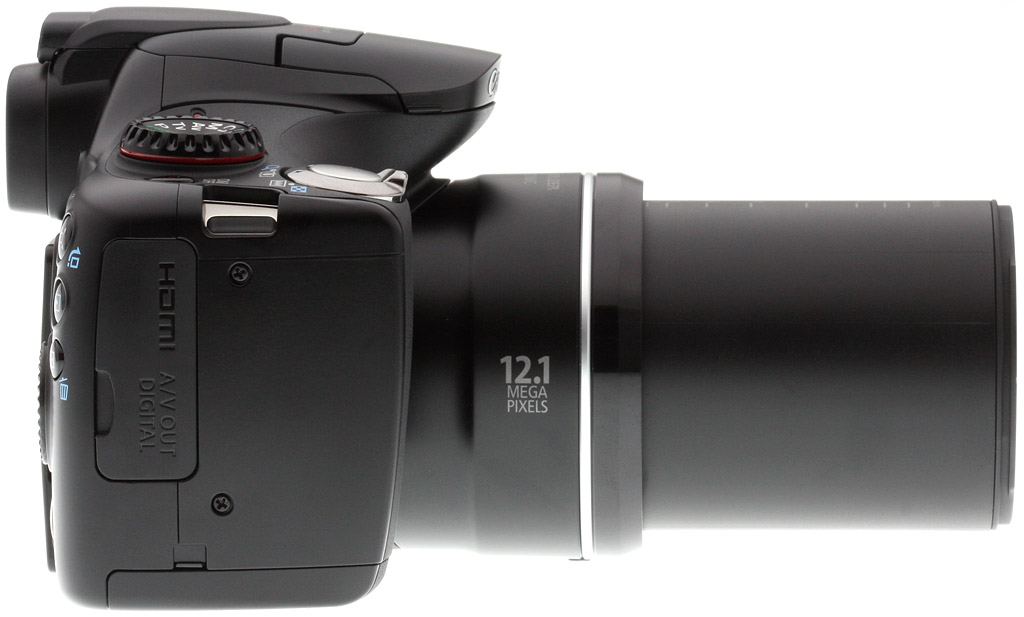
The left side of the Canon SX40 has a small speaker grill and the hinge for the articulated LCD.
The LCD swivels out, twists around and flips back on itself. Holding the camera at the right angle and, at the same time, being able to compose the image on the LCD are not always the same camera position. A fully articulated LCD takes care of that.
On the right side is a rubber door covering the mini HDMI and AV Out/USB ports.
The back panel has a knubbed indentation for your thumb that sneaks right up to the Mode dial. To its right on the edge are, from top to bottom, the green power status LED, the Zoom Framing Assist/Jump button, the Playback button (which can toggle power), and the AF Frame Selector/Single Image Erase button. There are also some handy special function buttons right by your thumb.
Also by your thumb, but to the other side of the thumb grip is the Movie button. It's inset into a slightly raised rim, a nice idea. To the left of that is the rubber-covered eyepiece to the electronic viewfinder, which has a dioptric adjustment on its left side. To the left of that in the left corner is the Short Cut/Direct Print button.
The main controls on the back panel are the familiar ones of the four-way navigator, whose arrow buttons serve two functions. Up accesses EV, Right handles ISO, Down brings up the Self-Timer, and Left the Focus modes. The navigator itself is a very smooth scroll wheel I liked very much. At its center is the familiar Function Set button to access the menu system.
Below the navigator are the Display button and the Menu button, for the camera's main menu system.
To the left of all that is the articulated LCD.
On the bottom of the camera is the battery/card compartment door with a small port for the dummy battery of the AC adapter. Next to the door's hinge is a metal tripod socket.
Controls. While I'm not a fan of Power buttons, I really didn't mind the Power button on the SX40 HS. It's not miniscule, fortunately, so you can find it (even if you do have to look for it next to the Mode dial).
The Playback button also toggles power on the camera. Some cameras allow the Playback button to activate the camera (so you can see your images without extending the lens) but don't let you turn the camera off. I didn't realize just how much that annoyed me until I used the SX40 HS's Playback button. It's a smarter design.
The Shutter button and Zoom lever worked very well together, second nature really. The Zoom control is two speed. Press it just a little and it zooms slowly. Press further and it speeds up. Great for video.
I'm not a fan of Movie buttons on the back of a camera either. I don't want to push the camera forward (and down) when I start capturing video. But there's no room on the top deck for another button and this one is nicely positioned in a little cone ring. You just slide your thumb a bit further to the left to reach it. And on a megazoom, your left hand supports the lens, preventing the camera from dipping down when you press the back panel button.
The Canon SX40's Mode dial is really a work of art in itself, the most beautiful I've seen. I'm not sure why I'm so taken by a mere Mode dial, but it really has style. It's larger than most and nicely scooped out. It even has a dark red highlight barely visible on the bottom. Canon should get an award for it, really.
On top, the Canon SX40's hot shoe is hidden under a rubber cap, protecting it from corrosion and disturbing the lines of the top hump. It's a little hard to figure out at first, but you just push the cap forward until you see the front of it start to lift and then pull the front up and off toward the back.
There's also a user-definable Shortcut button that can be set to i-Contrast, White Balance, Custom White Balance, My Colors, Drive Mode, Flash Exp. Comp./Output, Light Metering, Aspect Ratio (my favorite), Servo AF, Powered IS, AF Lock, AE Lock, Digital Tele-converter, or Display Off.
The one issue I had with the Canon SX40's controls was when using Manual, Aperture Priority, or Shutter Priority. Some megazooms have a subdial to set the relevant option (aperture, shutter, or both). But the Canon SX40 HS relies on the scroll wheel.
It's a dandy scroll wheel, but I found myself accidentally pressing in too far as I tried to grip it to spin it left or right to change the aperture or shutter speed. And that would activate EV or the Focus mode or ISO.
The LCD is a 2.7-inch TFT color Vari-angle LCD with a wide viewing angle (which is not as important on an articulating screen) and about 230,000 dots, which is not among the finer resolutions these days. And in fact, I had trouble detecting soft focus in macro shots using the LCD.
The EVF has about 202,000 dots (67,000 x 3), and seems a bit cramped. It's not uniformly sharp, but was certainly usable.
Lens. With a 35mm equivalent focal length range of 24mm to 840mm, the 35x optical zoom on the Canon SX40 HS goes beyond the comfortably hand-holdable (even with Canon's optical image stabilization enabled). Add the 4x digital zoom and that 35x shoots up to 140x.
We actually used that to photograph a noisy squirrel handheld and were able to do it by somehow leading the camera as we pressed the Shutter button.
Macro gave us fits. The range is zero to 1.6 feet but with a 24mm equivalent wide angle, you always feel too far away and when you zoom in to the perfect, undistorted composition, it is out of the lens's macro range.
Maximum aperture ranges from f/2.7 at wide angle to f/5.8 at telephoto. Shutter speeds go from one second to 1/3,200 second, although the Canon SX40 HS does offer shutter speeds as slow as 15 seconds in Shutter priority mode.
Handily, the lens cap, which hangs by a cord, has a small finger on the inside so you can clip it to the shoulder strap.
Modes. The Canon SX40 HS gives you complete control over exposure with Program, Shutter Priority, Aperture Priority, and Manual modes with two Custom modes to store their settings. In addition to Program mode, it offers a Smart Auto mode. One Scene mode appears on the Mode dial itself (Sports) along with a Scene mode setting to access others. A Creative Filters and Movie option fill out the Mode dial.
You can set the Shutter speed with the scroll wheel from 15 seconds to 1/3,200 second (with a flash-sync speed as high as 1/2,000 second), depending on the zoom position with the Mode dial set to Tv. Shutter speeds slower than 1.3 seconds use ISO 100 only and are processed with dark frame noise reduction. With the Shutter button half-pressed the shutter speed value appears in orange when the scene "has exceeded the correct exposure limits." If you enable the Camera menu setting for Safety Shift, it will automatically be adjusted.
You can set the aperture with the scroll wheel from f/2.7 to f/8.0, depending on the zoom position with the Mode dial set to Av. With the Shutter button half-pressed the aperture value appears in orange when the scene "has exceeded the correct exposure limits." If you enable the Camera menu setting for Safety Shift, it will automatically be adjusted.
Handheld Night Shot
Smart Auto, which can recognize a variety of scenes and configure the camera for them, is available for video captures too.
In addition to the Sports mode on the Mode dial, a number of Scene modes are available under the SCN option. Those include Movie Digest, Portrait, Landscape, Smart Shutter, High-Speed Burst HQ, Handheld Night Scene, Low Light, Beach, Foliage, Snow, Fireworks, Stitch Assist.
The Func. Set menu accesses a set of Creative Filters that include Fish-Eye Effect, Miniature Effect, Toy Camera Effect, Monochrome, Super Vivid, Poster Effect, Color Accent, and Color Swap. Here's a few of them:
Miniature
Fish-Eye
Toy Camera

Full HD video. 1,920 x 1,080 at 24 frames per second. Click image to download 43.2MB MOV file.
Movie. Like Still mode, Movie mode allows you to select among the various shooting modes (like Smart Auto and Manual) as well as a number of Scene modes, including Portrait, Landscape, Beach, Foliage, Snow, Fireworks, Miniature Effect, Monochrome, Super Vivid, Poster Effect, Color Accent, and Color Swap. A Wind Filter menu option can reduce wind noise.
High-Speed Video. 240 fps gets your water boiling. Click image to download 4.5MB MOV file.
Video can be captured at Full HD (1,920 x 1,080 at 24 frames per second), HD (1,280 x 720 at 30 fps), and SD (640 x 480 at 30 fps). A Super Slow Motion option captures video at either 120 fps at 640 x 480 pixels, or 240 fps at 320 x 240 pixels without zoom. Both play back at 30 fps. You can also record iFrame movies.
Movies are recorded with H.264 compression with stereo linear PCM audio in a MOV container. Optical zoom is available during recording, as is image stabilization. Mic level can be automatic, or manually adjusted.
You can capture stills while recording video by pressing the Shutter button during recording. The camera click and a brief blackout appear in the video clip when you do.
Menu System. Canon fans will be instantly familiar with the company's traditional menu system. And new Canon owners won't take long to figure out the two basic rules:
  • Use the Menu button to make changes to general camera behavior for Recording, Setup, Playback and Printing.
  • Use the Function/Set button to make changes to exposure settings.
In addition, the four-way navigator arrow buttons provide a few handy shortcuts as explained in the Controls section above.
Storage & Battery. The Canon SX40 HS uses SD, SDHC, or SDXC memory cards (and is Eye-Fi compatible). A 4GB card will hold 1,231 Large, Fine 4:3 images, or 14 min. 34 sec. of Full HD video.
The Canon SX40 HS is powered by a lithium-ion NB-10L battery pack. It can also be powered by the optional Compact Power Adapter CA-PS700 (when used with AC Adapter Kit ACK-DC80). Canon claims a shooting capacity of 400 shots with the EVF or 380 shots using the LCD or a playback time of nine hours. I was able to go several shoots before recharging, and even then I didn't get a low battery warning.
We're glad to see a small plastic cap for the Canon SX40's battery, to avoid accidentally discharging it when it isn't in the camera. And the charger needs no cord to plug into the wall, a blessing for travelers. The battery compartment door needs no lock or lever, pulling out sideways before it flips open.
You may also want to invest in a lens hood for the SX40 HS. Canon continues a policy of providing lens hoods only as an option.
Zoom Range. 24mm to 840mm eq. to 4x digital zoom.
Shooting. There's always a lot more to the cameras we review than any of us has a chance to explore. So I focus primarily on the basic shooting experience in Program mode. But with this year's models, some of the more advanced features have been irresistible.
Handheld Twilight Scene mode is one of them. I'm thrilled to report it has made it onto a Canon after appearing on other brands. It's really a winner for those very dark scenes in which nothing moves. And, in case you haven't guessed, it isn't just for twilight. Or night scenes. I took a shot of a car interior in a garage just to prove it opens up previously unphotographable scenes to the enquiring mind.
High-Speed Video is another. Like macrophotography, it shows you a world you otherwise can't see. With the Canon SX40 HS, I shot a few seconds of water boiling because water doesn't have to sign a release. But anything that moves is game.
Even some of the goofier effects were worth committing to memory. I like Canon's Fish-Eye effect. Toy Camera and Miniature were fun to play with, too.
And just when you thought low-light shooting was out for small digicams, with even ISO 400 suffered loss of detail, here comes a new round of cameras that can handle ISOs from 400 to 3,200 with grace. It's pretty clear that the manufacturers have been working on this issue -- and with more success than anyone expected. The Canon SX40 HS did better than most, too.
But getting back to the basics, what you have to love about the Canon SX40 HS is the lens. It's an astonishing 35x optical zoom starting at a very wide 24mm. You can easily extend the focal length beyond your ability to frame the subject -- even with Canon's image stabilization helping out.
And when you add 4x digital zoom to that, you're not going to leave the house without a tripod. Or, like me, you'll just confine yourself to the optical zoom range. Or something short of that.
My gallery shot of the Golden Gate Bridge tower is a case in point. So is the flag atop the Ferry building. The tower was the maximum 35mm focal length equivalent of 3,206.4mm with 2x digital zoom. The Ferry Building shot was a mere 840.5mm, the full optical zoom. Both were very difficult to frame handheld. I consider them lucky shots, frankly. As is the Transamerica Pyramid at 4x digital zoom in the zoom series.
So if you want the maximum zoom capability in a camera, this is your baby.
Studio Flash Macro. That hot shoe came in handy.
On the other end of the spectrum, macro shooting was a bit disappointing. You don't have to shoot macro at the widest wide-angle focal length (there is a bit of range there) but you do. And that means moving quite close to the subject. And distorting the subject quite a bit. The gallery has macro shots of a wet iris and some coins that are unhappily distorted. The iris even looks like it's drooping. Having just shot a more forgiving macro-capable camera with the Panasonic FZ150, I was disappointed with these limitations on the Canon SX40 HS.
I popped Photoflex's FlashFire trigger on the hot shoe to fire a StarFlash at my coins and it worked exactly as I expected it to. Having a hot shoe on your megazoom just adds to the fun. But once you've had the fun, you miss it on cameras that don't include one.
I did manage to get a bird shot for once, too. Birds being rather distant subjects in general, I did resort to 3.12x digital zoom and it isn't pretty as far as detail goes. But the shutter was very responsive, dSLR-like in fact.
Butterfly. No tricks.
More successful was my butterfly shot. No digital zoom. No macro. Just across the table from me. That long lens reaching discretely across and capturing every hair on its body. That's exactly what you want from a megazoom, and enough right there to make the Canon SX40 HS a Dave's Pick.
Detail from the 12.1-megapixel sensor even on more ordinary shots was fun to get lost in. The carnation shot, the bricks, the yellow rose, all were nicely captured with some lovely blurring in the background. But the rosemary shot in sunlight against a dark background was overexposed. It does show how smart the focus is, though.
A walk along the Embarcadero on a sunny day provided plenty of opportunities to push the Canon SX40 HS as a photo-making machine. There were compositions to frame from awkward spots and obstacles between the camera and the subject.
But whatever captured my eye, whether it was the big rivets on an iron bridge or the red lamp on the bumper below it, it was delightful to compose the image with the Canon SX40 HS. Zoom was slow enough to compose carefully and long enough to compose without compromise. It took some fiddling to get Juan Marichal's statue just right against the sky because I was up the block and across the street, but it's just the composition I wanted.
The play of light on the under-bridge shots and fireboat shot says a lot about the subtly of color the Canon SX40 is able to capture. The fireboat in particular charmed me, its white ropes holding detail as the red paint in shadow gleams.
Absorbed in the fun of photographing these subjects on my walk, my only complaint was the weight of the camera. It's built tough and it can be tiring to hold for hours. But that's one of those problems that goes away with use as you build up those wrist muscles.
If, that is, you use a wrist strap instead of the shoulder strap included with the Canon SX40 HS. I prefer a wrist strap, so I found the SX40 HS more tiring than you would with it hung from a shoulder.

Canon PowerShot SX40 HS Lens Quality

The PowerShot SX40 HS offers an impressive 35x optical zoom, equivalent to 24-840mm on a 35mm camera. 840mm is too long for some of our lab shots, so some of our telephoto results are at between ~20x and ~21x (~485 to ~503mm eq.).

Wide: Sharp at center
Wide: Soft at upper right
21x Tele: Slightly soft at center
21x Tele: Mild blurring, upper right corner
Sharpness: The wide-angle end of the Canon PowerShot SX40 HS' zoom shows some mild blurring in the corners of the frame compared to what we see at center. Though mild, blurring extends fairly far into the image area. At 21x telephoto, blurring is lower.

Wide: A small amount of barrel distortion; only slightly noticeable
35x Tele: Low pincushion distortion, slightly visible
Geometric Distortion: The Canon PowerShot SX40 HS produced low barrel distortion at wide-angle (~0.3%), and slight pincushion distortion (~0.2%) at full telephoto. Thus, the PowerShot SX40 HS' processor works hard here.

Wide:
Moderate
21x Tele:
Low
Chromatic Aberration: Chromatic aberration at wide-angle is moderate in terms of pixel count, though pixels aren't overly bright. At 21x telephoto, pixels appear a little brighter, mainly with a glow of bluish pixels visible. The SX40's DIGIC 5 processor does a good job suppressing CA.

Macro
Macro with Flash
Macro: The Canon PowerShot SX40 HS' Macro mode captures a sharp image with strong detail at the center of the frame, with mild blurring and noticeable chromatic aberration in the corners and edges of the frame (a common limitation among consumer digital cameras in macro mode). Exposure is quite uneven, with strong highlights along the left of the frame and deep shadows on the right. Minimum coverage area is 1.74 x 1.30 inches (44 x 33mm), which is quite good. The camera focuses so closely that the flash is blocked by the lens almost entirely, with the edge of the shadow along the upper left corner.


Canon PowerShot SX40 HS Viewfinder Accuracy


Wide: LCD Monitor
Wide: EVF
20x Tele: LCD Monitor
20x Tele: EVF
Viewfinder Accuracy: The Canon PowerShot SX40 HS' electronic viewfinder showed coverage that varied between just over 99% at wide-angle to just under 100% at 20x telephoto. The LCD monitor's coverage was just over 100% at wide-angle, and just under 100% at 20x telephoto. These are good results, but you can tell by the variable results that some significant distortion correction is being performed.


Canon PowerShot SX40 HS Image Quality


Color: The Canon PowerShot SX40 HS produced very good overall color, though bright yellows are noticeably undersaturated, while strong reds, blues and some greens are pumped a little (greens least of all). Hue is also a little off for colors like yellow, orange, and cyan, though is fairly commonplace among many digital cameras. Dark skintones are pushed toward yellows, while lighter skin tones show only a tiny nudge toward red. Overall, good performance.

Auto WB:
Good, though slightly red
Incandescent WB:
Too pink
 
Manual WB:
Very good
Incandescent: Manual white balance handled our incandescent lighting much better than the Incandescent setting, which came out much too pink. Auto produced better results than average, though with a slight reddish tint.

Horizontal: 1,800 lines
Vertical: 1,800 lines
Resolution: Our laboratory resolution chart revealed sharp, distinct line patterns down to about 1,800 lines per picture height in both directions. Extinction of the pattern occurred at between 2,200 and 2,400 lines per picture height.

Wide: Good
Tele: Slightly dim
Auto Flash
Manual Flash, +0.7 EV
Flash: Our manufacturer-specified testing (shown at right) showed good flash exposure at 23 feet at wide-angle, though the camera raised ISO to 320. The telephoto test came out just slightly dim, despite the same ISO increase to 320 at 9.8 feet.
Auto flash produced fairly bright results in our indoor portrait scene, retaining some of the ambient light by using a slower shutter speed of 1/25 second, and raising ISO to 250. The Canon PowerShot SX40 HS' image stabilization should help with the slower shutter speed, but any movement by the subject could be problematic at this shutter speed. Using manual flash at ISO 100, we were bale to get a bright image at a fairly fast shutter speed of 1/60s by using +0.7 EV flash exposure compensation. Good results here. Shot taken at ~5 feet (~1.5m) on a stable tripod.

100
200
400
800
1,600
3,200
ISO: Noise and Detail: The PowerShot SX40 HS produced good detail at ISO 100 and 200, with visible softening starting at ISO 400 and progressing from there. Chroma (color) noise is fairly well controlled, though it starts to affect color at the higher settings. Luminance noise notably increases, but so do the camera's attempts to suppress it, resulting in smudgy details. See Printed section below for more on how this affects prints.

Print Quality: The Canon SX40 makes surprisingly good 16x20-inch prints at ISO 100.
ISO 200 shots also look good at 16x20.
ISO 400 images have increased noise processing applied, and while they are usable at 13x19, we'd recommend printing at 11x14 inches for better results.
ISO 800 images are a little too soft in reds and other solid colors at 11x14 inches, but they make a good 8x10.
ISO 1,600 shots at 8x10 are again a bit soft, but look pretty good at 5x7 inches.
ISO 3,200 shots are good at 4x6, though detail in reds is still pretty soft.
Overall, the Canon SX40 makes excellent prints.


Canon PowerShot SX40 HS Performance


Startup Time: The Canon PowerShot SX40 HS takes about 2.6 seconds to power on and take a shot, which is on the slower side of average.

Shutter Lag: Full autofocus shutter lag is a little slower than average these days, at 0.46 second at wide angle and 0.58 second at full telephoto. Prefocus shutter lag is 0.116 second, not the fastest around, but still reasonably quick.

Cycle Time: Cycle time is on the slower side, with the SX40 HS capturing a frame every 2.56 seconds in single-shot mode, though High-speed Burst HQ mode captures 8 frames at a rate of 10.3 frames per second.

Flash Recycle: The Canon PowerShot SX40 HS' flash recycles in about 5.4 seconds after a full-power discharge, about average.

Low Light AF: The camera's AF system was able to focus down to just above the 1/8 foot-candle light level without AF assist enabled, though the camera was able to focus in complete darkness with the AF assist lamp enabled.

USB Transfer Speed: Connected to a computer or printer with USB 2.0, the Canon PowerShot SX40 HS' download speeds are moderately fast. We measured 6,266 KBytes/sec.


In the Box

The retail box contains:
  • The Canon SX40 HS camera
  • Battery pack NB-10L with terminal cover
  • Battery charger CB-2LC/CB-2LCE
  • Lens cap with cord
  • USB cable
  • Shoulder strap NS-DC11
  • Case for hot shoe cap
  • Digital Camera Solutions CD, which also includes a PDF manual
  • Documentation kit with Getting Started guide and Warranty card

Recommended Accessories

  • Extra battery pack for extended outings
  • Large capacity SDHC/SDXC memory card. These days, 8GB is a good tradeoff between cost and capacity. Canon recommends Speed Class 6 or faster to record HD video.
  • Camera case
  • Lens hood
  • Mini HDMI cable

Canon SX40 HS Conclusion

Pro: Con:
  • Very long 35x lens is also wide
  • Very good image quality
  • Attractive camera design is also compact
  • Stereo microphones
  • Built-in hot shoe
  • Articulating LCD
  • Good grip, front and back
  • Excellent controls
  • Playback button powers camera on and off without extending the lens
  • Quality mode dial
  • EVF has fairly high eyepoint
  • Good range of shutter speeds and apertures
  • Handy Scene modes
  • Handheld Twilight mode works well
  • High Speed video is fun to use
  • Full HD video capture
  • Good, familiar menu system
  • Relatively sharp corners
  • Very little geometric distortion
  • Chromatic aberration well controlled
  • Good color
  • Good Auto White Balance
  • Fairly high resolution
  • Decent flash performance
  • Excellent print quality, capable of making a good 16x20-inch print
  • 10 fps for 8 frames in High-speed Burst HQ mode
  • Fast USB transfer speed
  • Good battery life
  • Lacks dedicated subdial for aperture
  • Rear scroll wheel a little too sensitive
  • Relatively low-res LCD
  • EVF is small, low-res
  • Macro seems insufficient
  • No lens hood included
  • A little bit tiresome to hold after awhile
  • No in-camera sweep Panorama
  • Full HD video is limited to 24 fps
  • Slow startup time
  • Slow cycle time in single shot mode
  • AF not as fast as some competitors
  • No control over noise reduction
  • No RAW mode
  • No AV cable included

At first glance, the Canon SX40 HS is simply a beautiful camera. When you get it into your hands, it's only just beginning to delight you. You'll enjoy the color and detail it captures long after you forget what fun it was to compose with it. The specs are reassuring, too. The Canon SX40's 35x optical zoom, ranging from 24-840mm, feeds a 12.1-megapixel CMOS sensor that brings high-speed Full HD video captures with it. The 2.7-inch articulated LCD is just the ticket for framing awkward shots while the EVF does the job in sunlight.
Stepping back from the SX30's 14.1-megapixel sensor improved high ISO performance, and adding the latest DIGIC 5 processor brought chromatic aberration and distortion under control.
The Canon SX40 HS is heavier than other megazooms and macro shooting was a bit more limited, but these are small complaints. The heft is an indication of superior build, and the macro issues a tradeoff with the zoom range. Print quality was also a pleasant surprise, with its lowest ISO settings easily producing a good 16x20-inch print, and the highest producing a good 4x6.
Canon has produced some nice long zooms in the past but the Canon SX40 HS is among the finest megazooms we've had the pleasure to shoot with. That certainly earns it a Dave's Pick.